
Logging in at RollySpin Casino is quick and clean: the platform uses a simple sign-in pop-up where you enter your email and password, and you’re back in the lobby in seconds. This page explains how the RollySpin login works, what to do if you can’t access your account, and how to register a new profile (including promo code and Welcome Pack details).
To access your account, open the Sign in window from the top-right corner of the website. The login form is minimal, which is great when you just want to jump into slots or Live Casino without extra steps.
RollySpin Casino login steps:
What you’ll see in the login form:
Most login problems come down to a typo, saved credentials, or password mismatch. Before contacting support, try these quick checks.
Fast troubleshooting checklist:
If the form still won’t accept your details, use the reset option below.
If you don’t remember your password, use the Forgot your password? link in the login pop-up. This typically starts an email-based reset flow where you confirm your address and create a new password.
Tips for a smooth reset:
Even if you’re just playing casually, account security matters—especially for withdrawals. A few simple habits reduce risk and help you avoid delays later.
Best practices:
Creating an account is done via a sign-up pop-up, and it’s clearly tied to the Welcome Pack. Registration is straightforward: email + password + country, optional promo code, and mandatory acceptance of Terms & Privacy.
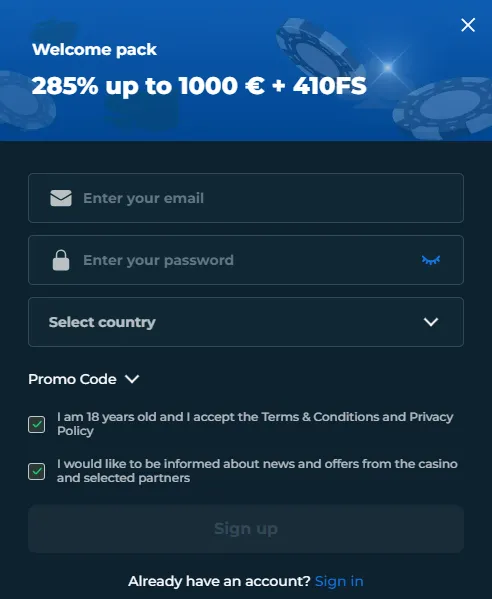
To open the form, click Sign up in the header or use the sign-up link inside the login window.
How to create an account:
The registration window highlights the current Welcome Pack offer:
Welcome Pack headline:
285% up to €1000 + 410 Free Spins
This is positioned as the main new-player incentive, so if you’re planning to claim it, it’s smart to check for any promo code field during sign-up and ensure you’ve selected the correct country before creating the account.
The sign-up form includes a Promo Code section that expands. If you’ve received a code (affiliate deal, VIP invite, seasonal campaign), enter it here before you finalise registration.
Good moments to use a promo code:
If you don’t have a code, you can leave this section blank.
During registration, you’ll see at least two checkboxes:
What this means for players:
Once your account is created, you can log in immediately and start browsing games. However, for payments and withdrawals, most casinos may request verification at some stage.
Typical next steps after sign-up:
Login is for you if:
Sign up is for you if:
Yes—real-money gameplay requires an account. Registration is done via the Sign up form.
Yes. The promo code field is optional.
Email, password, country selection, and acceptance of Terms & Privacy (18+).
Use “Forgot your password?” first, then try basic troubleshooting (browser/cache). If it still fails, contact support via live chat or email.